Skip to content

Mobile & cloud · Pakistan

Construction management app for Pakistan (web, mobile, cloud)

Give field teams and head office one cloud platform with mobile access, real-time collaboration, and role-based permissions, no laptop-only spreadsheets.
Overview

Mobile construction app for construction businesses in Pakistan

The people who generate the most valuable data in a construction business are the ones least likely to be sitting at a desk. Supervisors, storekeepers, and site engineers spend their day walking a site. Any system that requires them to return to an office to record what happened will collect a version of events written from memory at six o’clock, which is worse than useless because it looks like data.

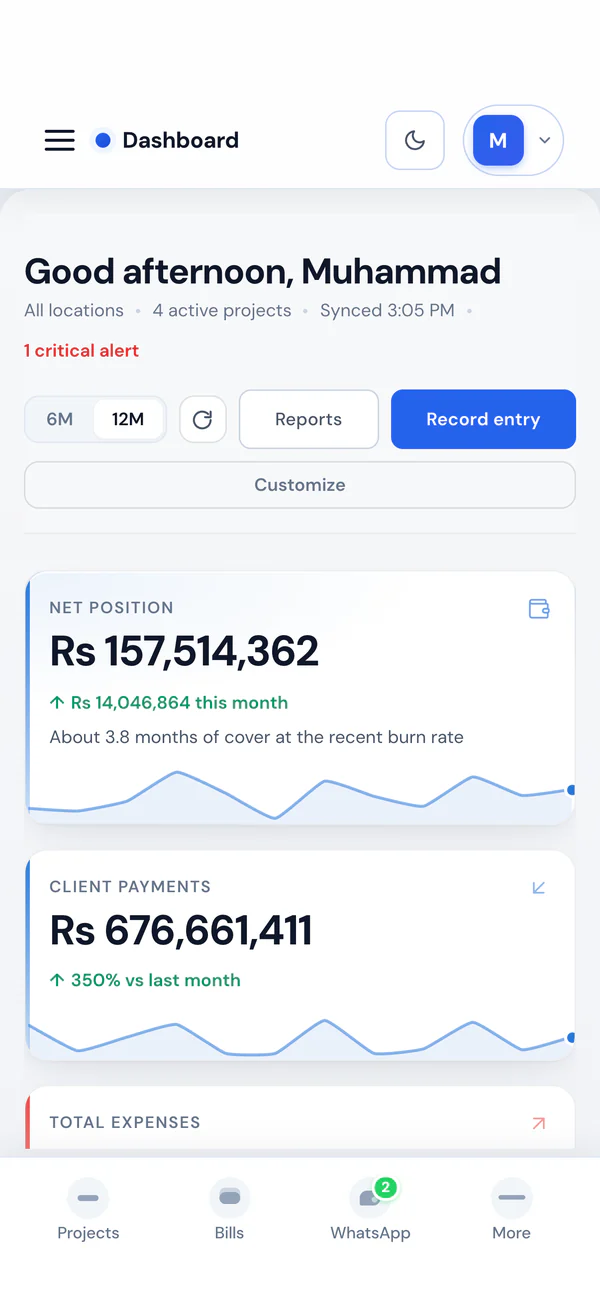
A construction management app solves this by meeting people where they are. Smart Construction runs in a browser on any phone, tablet, or laptop, with no install, no app store, and nothing to keep updated. A supervisor opens a link, records the day, attaches photos, and marks attendance in a few minutes. Head office sees it immediately.

This is a design decision rather than a convenience. Field adoption is the strongest single predictor of whether construction software delivers anything at all, and adoption is decided by how much friction sits between a person on a site and the record they are being asked to keep. Short entries, no install, and a device they already own is what makes the difference.

What you get

  • Site and office teams on the same live records
  • Faster field updates without paper and WhatsApp threads
  • Secure access with role-based permissions

Core capabilities

  • Cloud, web, and mobile access (Android and iPhone browsers)
  • Real-time collaboration across teams
  • Installable PWA for app-like use
  • Role-based permissions and secure data

How it works

Capability by capability

Everything below is included on Starter, Growth, and Enterprise. Plans differ only on active project and user limits.

Browser-based, no install

Access is through a browser on any device, so there is no app store, no version to update, and no IT approval needed before a new supervisor can start recording.

  • Works on phones, tablets, and laptops
  • Nothing to install or update

Short daily workflows

Field entries are deliberately kept to what a supervisor will complete between site rounds. A long form produces no data, which is worse than a short one that produces some.

  • Daily diary in minutes
  • Attendance marked by crew

Photos captured in context

Progress photos are attached to the project, package, and date from the device that took them, rather than being sent separately and filed later, if ever.

  • Photos attached at capture
  • Retrievable by what they evidence

Same-day office visibility

Because it is a cloud platform, a submission from site is a head-office update immediately, which changes response time on blockers from days to hours.

  • Cloud, not a synced local copy
  • Office responds while it still matters

WhatsApp for people who will not sign in

Scheduled reports, payment reminders, and a bot deliver information through the channel your teams and clients already use, which is where most of the adoption problem actually disappears.

  • Scheduled WhatsApp reports
  • WhatsApp bot for on-demand access

Role-scoped access from any device

A supervisor on a phone sees their project’s site records. They do not see billing, payroll, or vendor balances, so putting the field on the system carries no commercial exposure.

  • Permissions by company, project, and module
  • Field access without commercial exposure

Before and after

What changes in practice

The same work, run the way most contractors run it today and the way it runs on the platform.

Spreadsheets and WhatsApp threads: Site records written from memory in the evening
On Smart Construction: Records captured at the point of work
Spreadsheets and WhatsApp threads: An app to install, approve, and keep updated
On Smart Construction: A browser link on the device they already own
Spreadsheets and WhatsApp threads: Photos sent separately and filed later
On Smart Construction: Photos attached to project and package at capture
Spreadsheets and WhatsApp threads: The office learns about a blocker at the weekly meeting
On Smart Construction: Blockers visible the same day
Spreadsheets and WhatsApp threads: Directors phoning for a status update
On Smart Construction: Scheduled WhatsApp reports delivered automatically
Spreadsheets and WhatsApp threads: Field access means giving away commercial visibility
On Smart Construction: Permissions scoped by module and project

Use cases

Situations this is built for

Recognisable scenarios from construction businesses operating in Pakistan.

A site four hours from head office

The situation
A contractor wins work outside its home city. Supervision is local, but every commercial decision and every piece of reporting still runs through head office.
How Smart Construction handles it
The site team records the daily diary, attendance, and material movement from their own phones while approvals stay at head office.
What changes
The company operates outside its home market without relocating senior staff or losing visibility.

A storekeeper with a notebook

The situation
Goods received and issues are recorded on paper and typed up weekly, by which point discrepancies cannot be traced to a delivery.
How Smart Construction handles it
Receipts and issues are recorded on a phone at the point they happen, against the order and the work.
What changes
Short deliveries are caught at the gate rather than at the ledger, and the store reconciles continuously.

A director who will not use a dashboard

The situation
A managing director wants the weekly position but has no intention of signing into a system, so the information arrives by Sunday phone call.
How Smart Construction handles it
Scheduled WhatsApp reports deliver the summary automatically, with a bot for anything more specific.
What changes
The information arrives without anyone preparing it, and the call becomes a decision rather than a status request.

Benefits

What improves, and why it matters

Records written when they happen

Capture at the point of work beats capture from memory at the end of the day, every time.

No deployment problem

Browser access means a new supervisor is productive in minutes with no install, approval, or device standard.

Response time in hours

Same-day visibility of site submissions changes how quickly the office can unblock the field.

Adoption that holds

Short workflows on a device people already own is what keeps field capture running after month three.

Leadership without dashboards

WhatsApp delivery reaches the decision makers who will never sign in, which is most of them.

Field access, no commercial exposure

Role scoping means putting the whole site on the system does not put your ledgers on it.

Modules

Key modules included

Full construction ERP on every plan: projects, commercial, labour, and site in one subscription.

Mobile access

Use the platform from any device, anywhere.

Field capture

Attendance, site diary, and photos on site.

Collaboration

Shared records for office and field.

Permissions

Role-based access for every user type.

Included

Everything covered on this page

One subscription. Nothing on this list is a paid add-on.

  • Browser access on phones, tablets, and laptops
  • No app install or store approval required
  • Daily site diary from the field
  • Labour and employee attendance from site
  • Progress photo capture and attachment
  • Goods received and material issues on site
  • Site issues raised for office action
  • Drawing and document lookup from the field
  • Same-day head office visibility
  • Automated WhatsApp reports and reminders
  • WhatsApp bot for on-demand report access
  • Role-scoped permissions on every device

Terminology

The vocabulary on this page, explained

Plain definitions of the terms Pakistani contractors and consultants use day to day.

Cloud platform
Software running on the vendor’s servers and accessed over the internet, so every user sees the same current data without syncing local copies.
Field adoption
Whether site teams actually complete the records a system depends on. It is the strongest single predictor of whether construction software delivers value.
Progressive web app
A web application that behaves like an installed app on a phone, giving app-like access without an app store download.
Same-day visibility
The office seeing a site submission on the day it is made, rather than at the next weekly report. It is what turns a record into an operating tool.
Role-scoped access
Permissions granted by job function and project, so field users can record site data without visibility of commercial records.

Questions

Frequently asked questions

Is there a mobile app for Android and iPhone?

The platform is a cloud web app and installable PWA, so it works on Android and iPhone browsers as well as desktop, with app-like access.

Can field teams use it on site?

Yes. Supervisors and engineers capture attendance, diary, and photos on site, syncing with head office in real time.

Is data secure with multiple users?

Yes. Role-based permissions control what each user sees and does, with secure cloud storage.

Is there an app to download?

The platform runs in a browser and can be added to a phone home screen, so it behaves like an app without an app store download, an install, or an update to manage. That matters on sites where devices vary widely.

Does it work on low-end Android phones?

Yes. The field workflows are lightweight and browser-based, which is deliberate: a system that requires a current-generation device will not be used by the people whose data matters most.

What if a site has poor connectivity?

The workflows are light enough for ordinary mobile data. On sites with genuinely intermittent signal, teams typically complete entries at the point in the day when connectivity is reliable.

Can supervisors see commercial information?

Only if you grant it. Permissions are scoped by company, project, and module, so a supervisor can record site data and attendance with no visibility of billing, payroll, or vendor balances.

See it on your projects

Book a walkthrough built around your own workflows, or compare PKR plans before you subscribe.

Call +92 333 2466662 during Pakistan business hours, or book online.

Book demo